One frame at a time
Step one frame back or forward. You can also change the playback speed. With a keyboard, hold an arrow key to keep stepping. Hold Shift to jump a fixed number of frames for bigger timelines.
Animation and motion reference
Slow the video or GIF down. You can also step through it one frame at a time.
The video stays on your board, next to drawings or notes you make.
 opens in a new tab
 Free for 7 days, then one purchase. No card. No subscription.
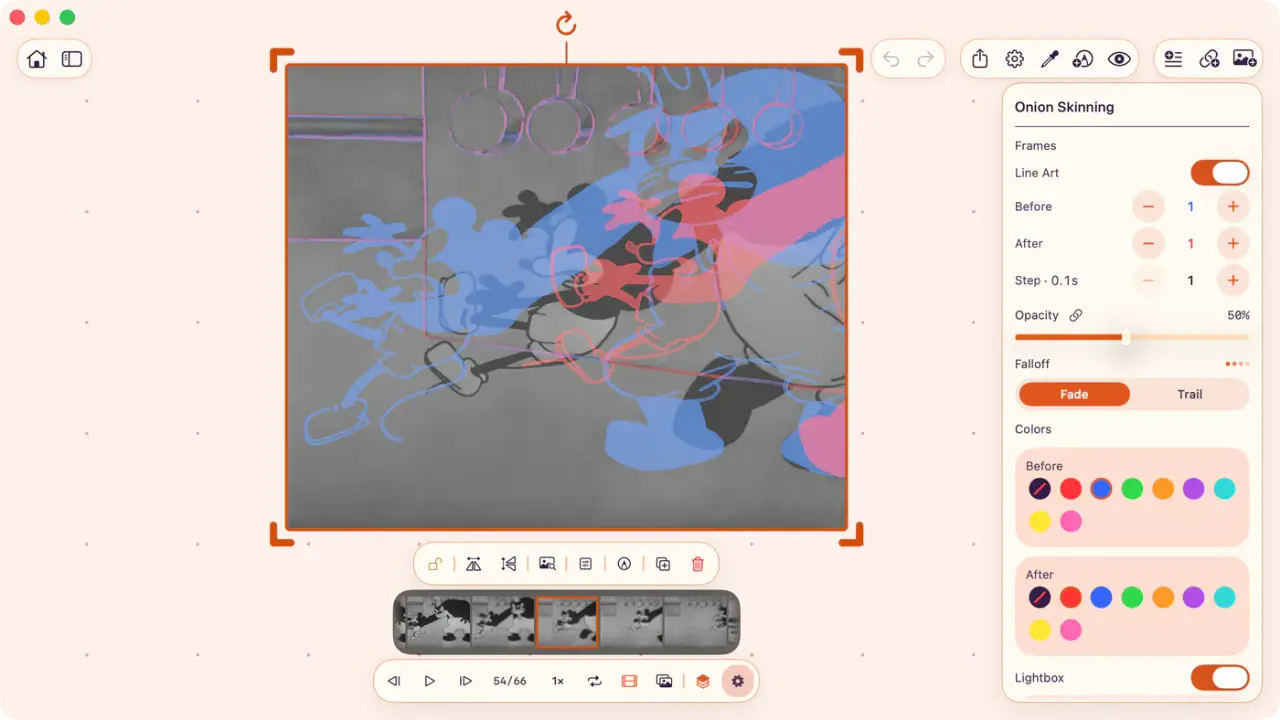
Onion skinning shows frames before and after as colored ghosts.
GIFs also get a filmstrip: tap a cell to select it, or drag it onto the board.
Motion tools
At full speed, a contact or some change in spacing is too fast to study.
Slow the video down or move one frame at a time.
Step one frame back or forward. You can also change the playback speed. With a keyboard, hold an arrow key to keep stepping. Hold Shift to jump a fixed number of frames for bigger timelines.
The filmstrip shows every frame of a GIF as cells. Tap one to jump there, or drag one onto the board to keep the frame as an image.
You can select the offset and how many ghosts to show before and after. Line Art keeps clean strokes for drawn animation, and Lightbox helps dim the current frame to better see the other ones.