

This guide started with a question on the Freeform subreddit. Someone had several boards of two to three gigabytes each, mostly embedded video. Their iCloud account was almost full, and their 1 TB iPad had plenty of room. They wanted to move the boards onto the iPad without deleting anything.
In ArtDeck, a board takes space on the iPad so it can open without a connection. With iCloud sync on, ArtDeck also keeps a copy in your iCloud account, so your other devices can get it.
The local copy is the one that makes the board work, and the iCloud copy is only how it reaches your other devices. You can keep the first without the second, which keeps a board full of video out of your iCloud storage.
Two switches, two different jobs
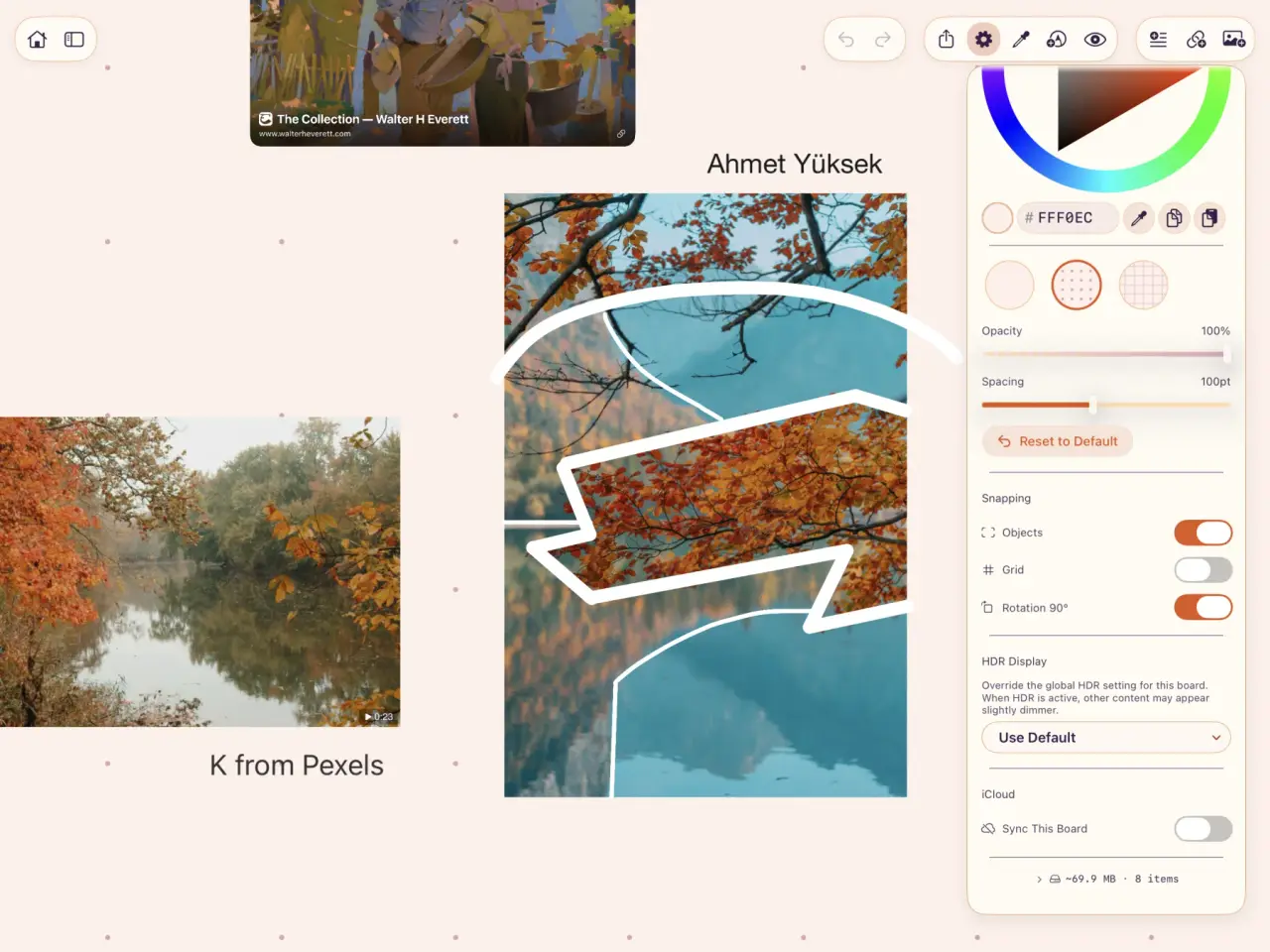
Sync with iCloud in App Settings turns sync on or off for the whole app. Sync This Board in Board Settings decides whether the board you have open takes part.
Turn off Sync This Board for a project that’s too big for your iCloud plan, or one that just belongs on one device. The board stays editable there. Copies already on your other devices are left alone, and new changes stay on this device.
Turn off the app-level Sync with iCloud when everything downloaded on that device should stay there. Boards that only exist in iCloud drop out of the gallery until sync is back on, because their contents were never stored on that device. Check which boards are which before you touch either switch.
Check the local copy before you change anything
A thumbnail in the gallery doesn’t prove that a board and its media are downloaded. On Apple’s support forums, people report Freeform boards where the text synced and the images didn’t, so the second device showed captions next to empty spaces. Check the files before you clear the cloud copy.
Do this for each board you want to keep:
- Open the board while the iPad is online.
- Wait for any download or missing-file status to clear.
- Play each video and GIF that matters. If a large video arrived as a preview, use Get Original and wait for the full file.
- Open Board Settings, expand Board Storage, and check that the item count and storage use match the board you think you have.
- Export a full
.artdeckbackup to On My iPad, a Mac, or an external drive. Don’t put the only backup in the iCloud storage you’re about to clear.
Don’t skip the export. A local-only board lives in one place, and if you lose the iPad or delete ArtDeck, the board goes with it. Pulling files back out one at a time is a poor substitute for a full backup made beforehand.
Keep one board on the iPad
Open the board, then Board Settings, and turn off Sync This Board in the iCloud section. ArtDeck confirms that changes will stay on this device and that copies on your other devices aren’t affected.
From then on, changes stop syncing. The copy already in iCloud still takes the same space, which is fine if you still want that older version on a Mac. To get the storage back, use the app-level removal below.
Remove all ArtDeck data from iCloud
A separate control clears ArtDeck’s data out of iCloud and leaves the boards already stored on the device in front of you.
Before you use it, turn off Sync with iCloud on every other device where ArtDeck is installed. A device with sync still on can upload its local boards again the next time ArtDeck opens there.
On the iPad that has the complete local copies:
- Open App Settings > General > iCloud.
- Turn off Sync with iCloud and confirm Disable. ArtDeck states that boards already on the device will stay there.
- In the same section, find iCloud Data and choose Delete.
- Read the confirmation, then choose Delete from iCloud.
- Leave iCloud Sync off if the boards should stay device-only.
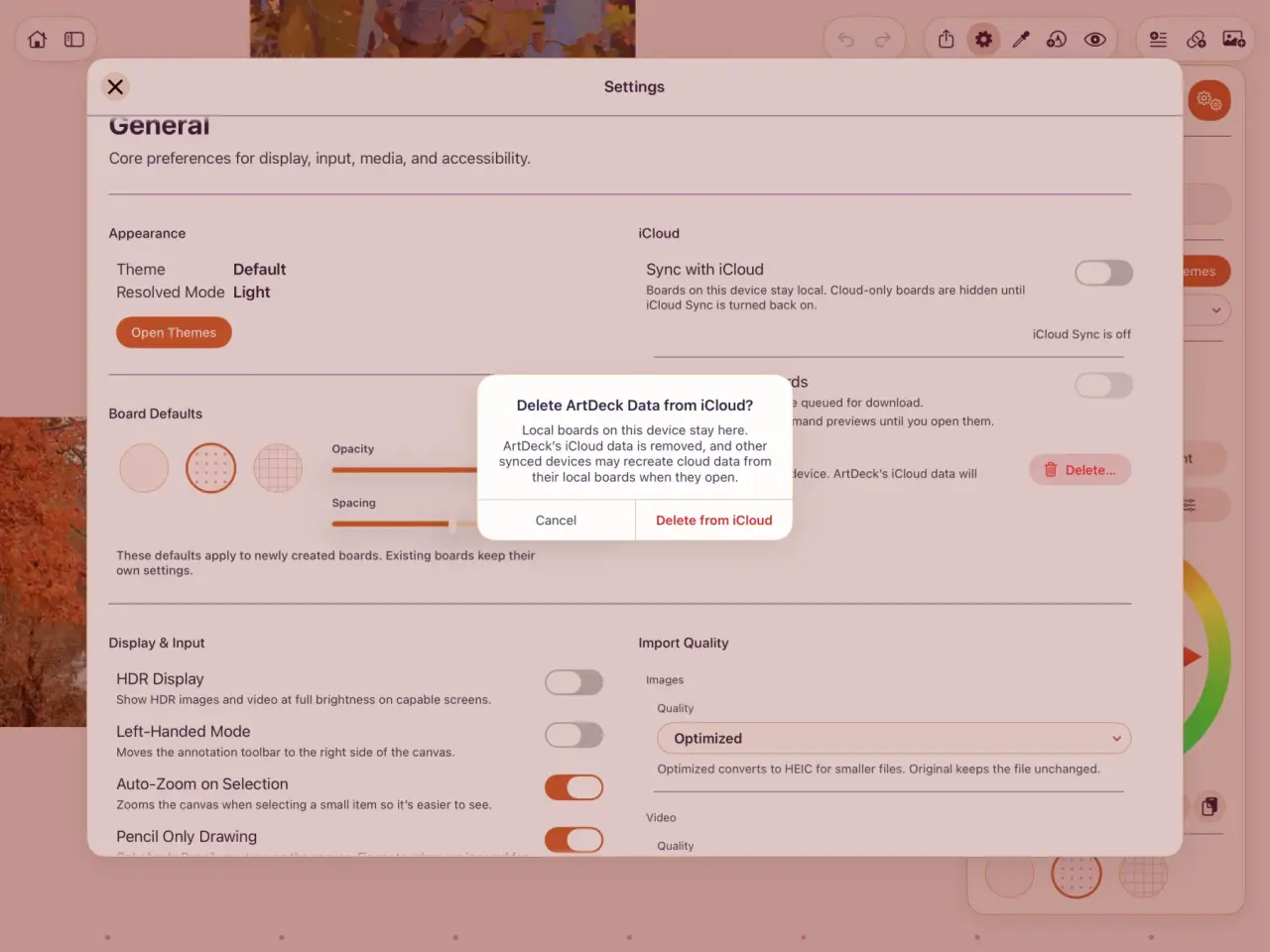
If you turn sync back on later, ArtDeck checks what’s in iCloud before it sends anything up. Keep the .artdeck backups until every board is where you want it.
This does not rescue an existing Freeform board
If you came here with a full iCloud account and a Freeform board you can’t move, read this before you touch anything.
Freeform doesn’t have the setting this article is about. Its iCloud switch is one control for the whole app. When it’s on, every board syncs through iCloud and each device keeps a local copy of what it has loaded. When it’s off, Apple’s setup guide warns that the device can’t reach those iCloud boards at all.
Freeform’s own settings page has no local-only mode either. For people who don’t use iCloud, it points to encrypted device backups instead.
So there’s no per-board choice, and no documented way to bring an existing iCloud board back into local storage with its editable contents and embedded video intact. Apple does let you send a link to an editable copy, but creating and downloading that copy needs iCloud and an Apple Account, and iCloud space is what you were trying to free.
Don’t toggle Freeform’s iCloud access to test a theory on your only copy. In one thread on Apple’s forums, someone turned Freeform back on in their Apple ID sync settings and expected their boards to show up on an iPhone. Instead, four or five boards disappeared from the Mac they were made on, and the fix offered was restoring a container folder from Time Machine.
Make a full device backup before you try anything. If you already have a Freeform storage or recovery problem, take it to Apple Support instead of changing settings.
The controls in this guide only work on ArtDeck boards. ArtDeck has no Freeform importer, so you rebuild a board here by hand.
The media is easier to get back than it looks. On a Mac, Freeform keeps the embedded originals as ordinary files in its group container, at full resolution and in their original formats. Pulling those files out is the first step of any move.
Freeform is still the better shared whiteboard, and it’s free. The ArtDeck and Freeform comparison covers what each one is for. ArtDeck is for a personal reference board, and where its media lives is your decision.
Common questions
Can an ArtDeck board work without iCloud?
Yes. A downloaded board stays fully editable with Sync This Board off, and ArtDeck works offline. There’s no ArtDeck account, and I don’t run a server that keeps a second copy.
Does turning off Sync This Board free iCloud storage?
No. It stops new changes from going up, and leaves the copy already in iCloud and the copies on your other devices as they are. To get the space back, turn off app-level sync first, then use Delete ArtDeck Data from iCloud.
Can I delete one board from iCloud and keep it on the iPad?
The per-board switch keeps that board local from now on, but the copy already in iCloud stays there. The cloud-data control clears all of ArtDeck’s iCloud data, not just one board’s. Export your backups and check every local board before you use it.
Will another device put the boards back into iCloud?
It can. The deletion confirmation warns about it: another synced device may recreate the cloud data from its own local boards the next time it opens. Turn ArtDeck’s iCloud Sync off on those devices first.